Booking models

Appointment booking system built around the person doing the work

The appointment model fits any business where a named person spends a defined amount of time on one customer. Its whole job is to answer one question honestly: is this hour genuinely available? An hour is available when the person who performs that service is free, when the room or chair it needs is free, and when the gap before and after it still fits. A grid of half-hours answers none of that, which is why a calendar can look empty and a day can still be impossible.

  1. Publish services and working hours

  2. Match a service with the right professional

  3. Show a clear time choice

  4. Keep the customer and team informed

Appointment scheduling platform for Cyprus service businesses with staff, locations and customer records.

What it solves

  • One-to-one services
  • Several professionals or locations
  • Customer follow-up around every visit
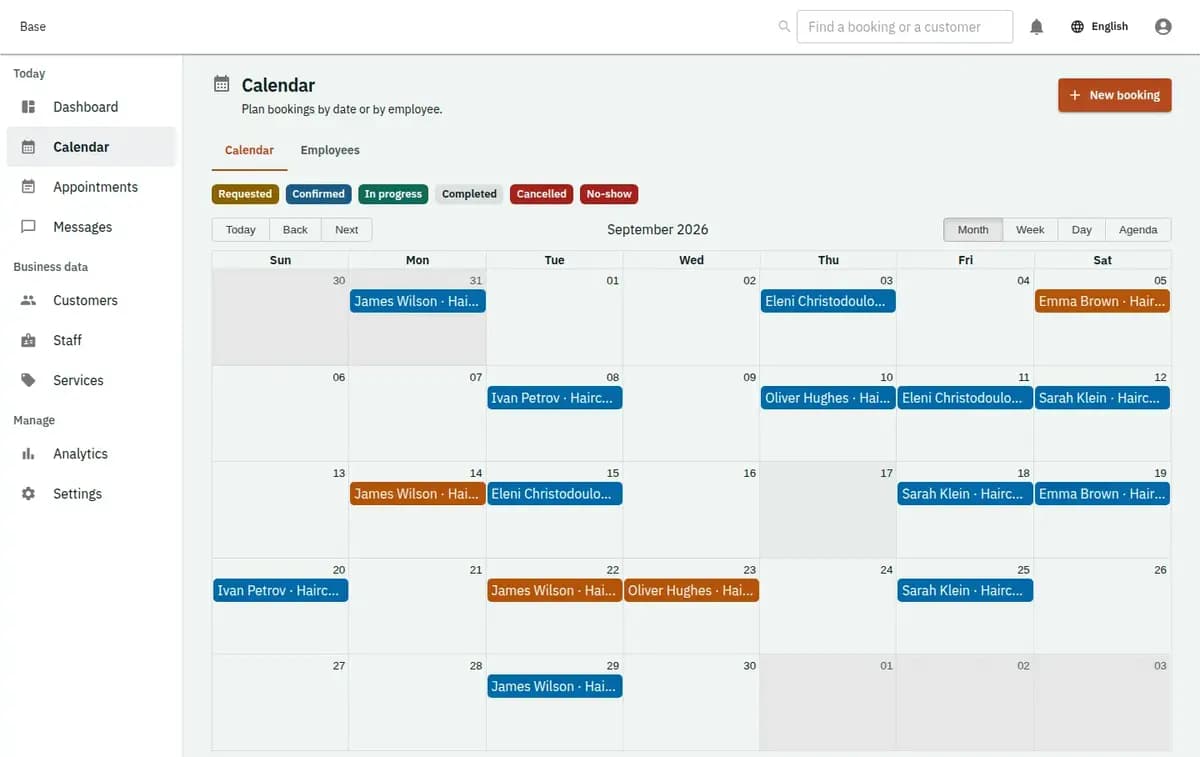
The booking console, with invented records — Appointment booking
A real console. The records in it are invented.

When an appointment booking system fits your business

Use it when you sell a person’s time in defined blocks: a haircut, a treatment, a consultation, a check-up, a lesson, an inspection at your own premises. It suits one person with a phone and a diary as well as a team of eight across two locations, and it holds up when different services take very different lengths, when a customer comes back to the same practitioner, and when a room or a chair is a second constraint alongside the person.

When another model fits better

A session where several people join at a set time and the limit is the number of places is the class model. Something taken away for days and brought back is the rental model. Nights in a property belong to accommodation. Work done at the customer’s address, where travel between jobs decides the day, is field service. Choosing the wrong model shows up immediately: you find yourself typing the same booking twice or leaving a constraint out of it.

What breaks in a calendar that only stores times

Four failures, and every one of them is a promise that looked possible when it was made.

A free hour is not an available hour

Nine o’clock is available when the person who performs that service is free at nine, when the room, chair or piece of equipment the service needs is free, and when the preparation and cleaning time around it still fits. Any calendar can show a blank square. What matters is whether all of those are true at once, and that is a check rather than a look.

The customer chose a person, not a slot

Regulars come back to the same person, and moving a booking to whoever is free is the fastest way to lose one. Availability belongs to each member of staff, so what is offered is that person’s time and nothing is silently reassigned in the background.

The service defines the duration, not the grid

A twenty-minute service and a ninety-minute one do not both fit a half-hour box. A calendar cut into equal squares either wastes the difference or runs late every afternoon, and both are invisible until somebody counts. Each service carries its own length and its own buffers, and availability is calculated from them.

Two ways in, one queue

A request from the website, a phone call written down by the person at the desk and a message answered at lunchtime are the same kind of thing and belong in the same place. When they are not, the double booking arrives from the direction nobody was watching.

Setting up appointment scheduling software in four steps

Four steps, in this order, because each one depends on the one before it.

1. Describe the services with honest durations

Every service gets the time it really takes, plus the preparation or cleaning that follows it. This is the number the whole calendar is built on, so the twenty-five-minute service that everybody knows takes thirty-five is worth admitting here rather than absorbing every day.

2. Enter the people and what each of them does

Working hours, days off, holidays, and which services each person actually performs. A member of staff who does not do colour work should not be offered for colour work, and the calendar is where that becomes a rule rather than something the desk has to remember.

3. Add rooms and equipment only where they limit you

A chair, a treatment room, a lift, a piece of equipment: enter it when two appointments genuinely cannot happen at once without it. Leaving out what does not constrain you keeps the calendar readable, and adding what does prevents the conflict that only appears when the day is busy.

4. Publish, confirm and record how it ended

Availability is published from the rules above, requests arrive in one queue, and each appointment ends as attended, cancelled in time, cancelled late or a no-show. That last step is what makes next month’s decisions — about hours, staff and notice periods — an argument about facts.

Three checks the appointment booking app runs on every confirmation

Three checks run together on every confirmation, and a refusal always says which one failed.

Person and resource, checked as one

An appointment that needs a practitioner and a room is refused when either is taken. Nothing is half-confirmed, and the desk sees which of the two was in the way instead of a blank rejection.

Buffers are real time

The gap for setup, cleaning or travel between two rooms is subtracted from availability. Two appointments that would only fit if nothing happened between them cannot both be confirmed.

A request does not hold the hour

An enquiry is visible without silently taking availability away from the customer standing at the counter. The hour is committed when somebody confirms it, which is the difference between a calendar that reflects the day and one that hoards it.

A contested chair and a loyal regular

The chair that two people wanted, and the customer who only sees one practitioner.

Two practitioners, one room

Both have a free ten o’clock, and both services need the treatment room. The first booking takes it; the second is refused with the room named, and the desk offers half past ten instead. Nobody discovers the clash with two customers already in the waiting area.

A regular who books the same person

The customer asks for Maria. Availability shown is Maria’s, including the week she is away, and when she is fully booked the answer is another day rather than another person. The booking that keeps a regular is the one that was not quietly reassigned.

What an appointment record holds

The calendar needs enough to run the day and nothing more; what a trade must keep beyond that belongs to the trade.

Only the details the appointment needs

A contact, the service, the person, the time and a short operational note. Health information, documents and anything a regulator would ask about belong in whatever system your profession already uses, under its own retention and access rules — not accumulated in a booking because the appointment happens to be medical, legal or personal.

The outcome is a fact, not a judgement

Attended, cancelled, late-cancelled, no-show: Base records what happened and when the cancellation arrived. What that costs, whether a deposit is kept and whether somebody may book again are decisions the business makes and applies. The calendar makes the conversation short by remembering the sequence.

Preparing online appointment booking software before you publish

Write your service list with the durations you actually run, and add the buffer you already take between customers even when nobody writes it down. Enter each person with their real working hours and the services they perform. Decide which rooms or equipment genuinely constrain you and enter only those. Write down your cancellation notice and what a late cancellation or no-show means, because that single decision settles most future arguments. Decide who may book and cancel on behalf of whom. Then put the next month of existing appointments in before you go live: the ones that will not fit are the ones you had already promised twice.

Bookings outside the appointment model

An appointment is one customer and one person for a defined time. Everything outside that shape has its own model.

Not classes, rentals or nights

Places on a session belong to class booking, an item taken away and returned to rental, and nights in a property to accommodation. Forcing them into an appointment loses the constraint that actually matters in each.

No money in the calendar

Prices can be recorded on a booking, but payment happens the way your business already takes it. Base does not process cards, does not invoice and does not decide what somebody owes after a no-show.

A refusal is a valid result

Staff already booked, a room in use, a service that will not fit before closing or a request inside your notice period stops the appointment. The previous state stands, the reason is named, and the customer is offered an hour that exists.

Appointment booking questions

Does it work for a one-person business as well as a team?

Yes. The same appointment scheduling software suits one person with a phone and a diary and a team of eight across two locations. Each person has their own working hours and services, and every booking checks the person, the room and the buffers together. The Free plan (€0) covers 2 staff accounts and 5 bookable items; Standard (€19/mo) and Pro (€39/mo) are there when the team grows, so you never need to switch to another appointment booking app.

Can different services have different lengths?

Yes, and they should. Each service carries its own duration and its own buffers, and availability is calculated from them rather than from a grid of equal slots.

Can a booking require both a person and a room?

Yes. Both are checked together and the appointment is refused when either is taken, with the refusal naming which one so the desk can offer a real alternative.

Can customers choose their practitioner?

Yes. Availability belongs to each member of staff, and nothing reassigns a confirmed booking to somebody else on its own.

Do phone bookings and web requests mix?

They arrive in the same queue. Staff enter what came by phone or at the counter with the same fields, so there is one calendar rather than two that disagree.

What happens with no-shows and late cancellations?

The booking records the outcome and the time the cancellation arrived. What it costs is your rule, applied by you; Base keeps the record that makes it easy to apply consistently.

Next step

Open a workspace and set up one booking flow

Registration takes an email address. The operating model, services and resources are configured afterwards, in the console.
