Booking models

Field service management software for jobs at the customer’s address

Field service is the model where the work happens somewhere else. That single fact rearranges everything: the promise is a window rather than a minute, the drive between two addresses is part of the day, and the person who is going needs the van, the parts and sometimes a second pair of hands. A calendar that treats a job as an appointment with an address attached will book a nine o’clock across town after an eight o’clock, and the day falls apart by eleven.

  1. Capture service and address

  2. Choose a team and time window

  3. Share job context

  4. Record completion and next action

Field service scheduling platform for addresses, teams, time windows and job status.

What it solves

  • Mobile teams
  • Work at customer addresses
  • Recurring or reactive jobs
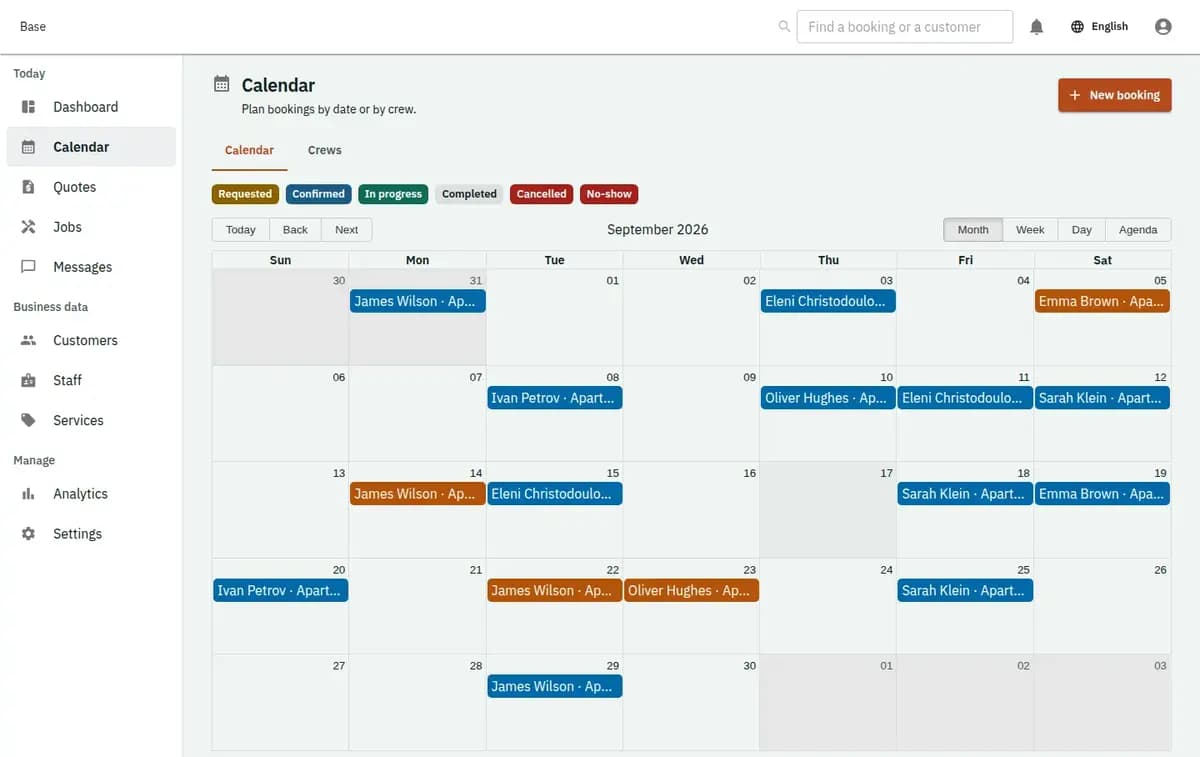
The booking console, with invented records — Field service scheduling
A real console. The records in it are invented.

When field service management software is the right fit

Use it when your people go to the customer: cleaning, plumbing and electrical work, appliance and device repair, air conditioning, pool and garden maintenance, pest control, mobile car detailing, deliveries with an installation. It suits one person with a van and a team of six with three vehicles, and it holds up when jobs vary from twenty minutes to a whole day, when a visit sometimes has to become a second visit, and when somebody has to be home for the work to happen at all.

When another model fits better

Work done at your own premises is an appointment — the customer travels, not you. Something the customer takes away is rental. Nights in a property are accommodation, and a group session with places is a class. The signal is travel: if nobody drives anywhere, this model is carrying weight you do not need.

What an address does to a schedule

Four things, and each of them is the reason a day that looked full became a day that ran late.

The customer is promised a window, not a minute

Traffic, a job that turns out to be worse than described, a customer who is not home: a nine-fifteen promise is a promise you will break. A window is honest, it can be narrower for the first job of the day than for the fourth, and it is what the customer is told, so the phone call at ten past nine stops happening.

The drive between two addresses is part of the day

Twenty minutes across a town at eight in the morning is not the same twenty minutes at two in the afternoon, and neither of them is free. Travel time belongs to the schedule, subtracted from what can be sold, or the fourth job of the day is a fiction that somebody has to phone about.

The van and the parts decide what is possible

A job needs a person, sometimes a specific skill, usually a vehicle and occasionally two people. A schedule that only assigns people will send somebody to a job they cannot finish, and the second visit costs more than the first one earned.

Nobody is home, and the visit is spent anyway

Access is the failure that generic calendars ignore. The gate is locked, the tenant forgot, the key is with a neighbour. The visit is recorded as attempted, the reason is on the job, and rebooking is a decision made from a record rather than an argument about whether anybody rang the bell.

Planning a day with field service scheduling software

Four steps, and the third is the one that keeps the afternoon alive.

1. Describe the jobs by what they really take

A service call, an installation, a routine visit, a callback: each with its honest duration, the skill it needs and whether it takes one person or two. If a job usually runs over, the correct place to say so is here, not at four in the afternoon.

2. Enter the people, the vehicles and the areas

Working hours, days off, the skills each person actually has, the vans that exist and, where it matters, which parts of the island somebody covers. A team of three with two vans can only do two jobs at once, and the schedule should know that before the phone rings.

3. Plan the day as a route, not as a list

Jobs are given arrival windows with travel between them subtracted from the available time. A day is full when the driving fits, not when the boxes are used up, which is a different and much later moment than most schedules admit.

4. Close the job where it happened

Arrival and completion times, what was done, parts used, notes and photographs, whether it needs a return visit, and the customer’s acknowledgement if you take one. Closed on site, the office does not spend the evening reconstructing the day from text messages.

Three protections built around travel time

Three protections, and all three are about the road rather than the diary.

Travel is subtracted from the day

The gap needed to get from one address to the next is part of the schedule. Two jobs that only fit if the van teleports are not both confirmed, and the refusal says so before a customer is given a window.

The person, the skill and the van are checked together

A job that needs a qualified engineer and a vehicle is refused when either is unavailable. A two-person job holds two people. Nothing is confirmed against a team that cannot actually turn up.

A window is a promise the schedule can keep

Windows are set from the real duration and the real driving, so telling a customer between ten and twelve means something. When the day slips, the jobs affected are visible while there is still time to call the people waiting.

A morning that would not fit and an unfinished visit

A morning that would not have fitted, and a visit nobody could complete.

Four jobs, one van, one town

Three jobs are booked in the same area and a fourth is requested on the other side. With travel counted, the fourth does not fit before five and is offered as the first job of the next morning instead. The alternative is a customer waiting until six and an engineer who has not eaten.

A locked gate at eleven

Nobody is home. The visit is closed as attempted with the reason, the photographs and the time recorded on the job. The office rebooks from that record, and the conversation about who owes what for a wasted visit has a fact in it rather than two memories.

What the job record carries about a home

Field work generates evidence about somebody’s home. It should carry what the work needs and stop there.

Notes and photographs of the work

What was found, what was done, what was used and what still needs doing, with who and when. It is a working record for the next visit and for a disagreement about the invoice — not a survey of the property and not something to collect beyond the job.

The address is operational data

Base holds where the work is and how to reach the person there. Access codes, key locations and anything about who lives alone are sensitive; keep only what the job genuinely needs, and decide who on the team can see it. The calendar does not track a vehicle and does not know where anybody is.

Preparing job scheduling software for the first week

Write your job types with the durations they really take, including the callback that always takes longer than the original visit. Enter each person with their real hours and the skills they actually have, and enter the vans, because two people and one vehicle is one job at a time. Set travel time honestly for the distances you cover — it is the single number that decides whether the afternoon holds. Decide your window widths and say them out loud in the words your customers will hear. Decide what happens when nobody is home. Then run one week with windows before you promise them to everybody.

Work at addresses beyond your control

The work happens at an address you do not control, and some of that is beyond any calendar.
Not tracking or routing optimisation

Base does not follow vehicles, does not read traffic and does not compute an optimal route. It subtracts the travel time you configured and shows what fits, leaving the driving decisions to the people doing them.

Not invoicing, stock or payroll

Parts inventory, invoices, hours worked and what an engineer is paid live in the systems you already run. The job records what was used and how long it took, which is the input those systems need.

A refusal is a valid result

No qualified person free, no van available, a window that will not survive the drive, or a request inside your notice period stops the job. The previous state stands, the reason is named, and the customer is offered a window that can actually be kept.

Field service questions

Is it worth it for a small team with one or two vans?

Yes. Field service scheduling software matters most when the team is small: three people with two vans can only do two jobs at once, and the schedule knows that before the phone rings. As job scheduling software, Base builds arrival windows from real durations and travel time. The Free plan (€0) covers 2 staff accounts and 5 bookable items; Standard (€19/mo) and Pro (€39/mo) follow as you grow.

Are arrival windows supported?

Yes, and they are the normal way to promise a visit. Windows are built from the real duration and the real travel time, so what the customer is told matches what the day can deliver.

Is travel between jobs counted?

Yes. Travel time is configured and subtracted from available time, which is what stops a fourth job being sold into an afternoon that is already on the road.

Can a job require two people or a specific vehicle?

Yes. People, skills and vans are checked together, and the job is refused when any of them is unavailable rather than confirmed and discovered on the day.

What happens when nobody is home?

The visit is closed as attempted, with the reason and any photographs on the job. Rebooking and what it costs are your decisions, made from that record.

Does Base track vehicles?

No. There is no tracking, no telematics and no route optimisation. It schedules with the travel time you set and records what happened at each address.

Next step

Open a workspace and set up one booking flow

Registration takes an email address. The operating model, services and resources are configured afterwards, in the console.