An online booking page that only offers hours you can keep

Most booking pages are contact forms wearing a calendar. They collect a wish, somebody reads it later, and the customer finds out on Monday that Saturday was never free. A booking page worth having answers the customer’s real question — can I have this, at this time — using the same availability the desk sees, and then puts the request where the team already works instead of in a second inbox.

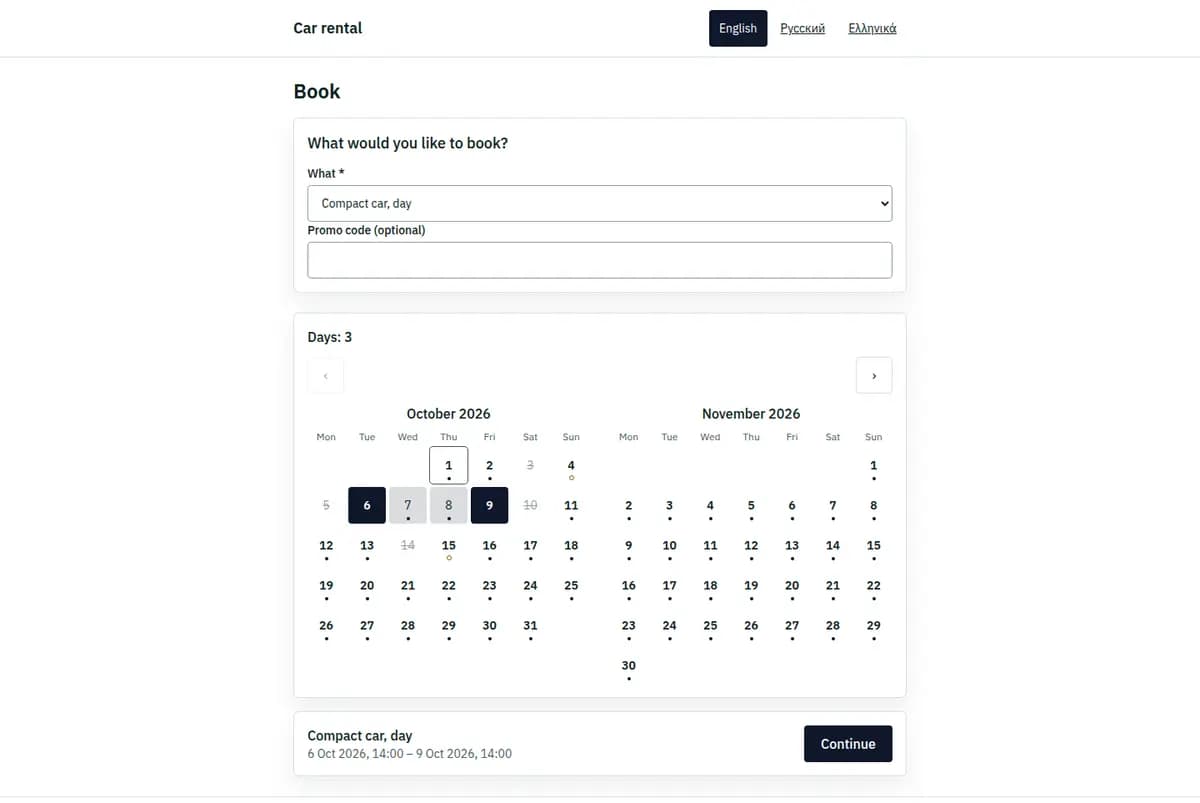
A business’s public booking page: a pick-up and a return chosen on the calendar
A real booking page. The business on it is invented.

Customers ask by phone, by message and in person, and every one of those answers has to be checked against a calendar somebody else is also writing in. The page answers for you, from the same availability your staff work off.

What is included

  • Your own address, no marketplace listing beside a competitor
  • What you sell, with the price and what it includes
  • Live availability, so a slot offered is a slot that exists
  • The request lands in the console as a booking, not as an email to retype
  • Direct customer journey
  • Live availability, not a form
  • Clear next steps and policy context

Where your booking page and booking widget are used

It is the page you send people to: from your own site, from a message, from a card in the window, from a printed sign at the counter. It shows what you offer, what is actually free, what it costs if you publish prices, and the rules a customer is agreeing to. It fits a business that would rather own the relationship than rent it from a marketplace, and it works the same whether the request is for an appointment, a place on a session, a rental or a stay.

What it is not

It is not a marketplace listing and does not bring you customers: nobody browses Base looking for a business. It is not a website, so your story, your photographs and your search presence stay where you already keep them. It does not take payment, and it does not promise anything the calendar cannot keep.

Why most booking forms make more work

Three failures, and all three of them arrive at the desk rather than on the page.

A form collects wishes, not bookings

When the page cannot see availability, every submission is a question somebody has to answer by hand, often the next morning, often to say no. The customer has already stopped thinking about it, and the business has done the work of a booking without getting one.

A second inbox is a second calendar

Requests that live in email, in a chat app or in a spreadsheet are invisible to whoever is standing at the counter. The double booking always comes from the channel nobody was watching, and the apology costs more than the booking was worth.

The form asks for everything, so nobody finishes it

Address, company, birthday, a message box: each field is another reason to give up on a phone at the beach. The page should ask what the job genuinely needs to be arranged, and leave the rest to the conversation that follows.

Four steps the customer walks through

Four steps, and the point of each is that the answer is true when it is given.

1. Choose what they came for

The service, the session, the item or the property, described the way you would describe it out loud. What is not published cannot be requested, so the page never offers the thing you stopped doing in March.

2. See what is genuinely free

The times, dates or places offered come from the same availability your team works against, with staff, resources, buffers and rules already applied. An hour that would be refused is not shown as available in the first place.

3. Give the details the booking needs

Contact, party size, dates, the extras that apply — and nothing that only matters to somebody else’s CRM. Where a rule has to be accepted, it is shown at the point of agreeing rather than linked in small print.

4. Land in the same queue as the phone

The request arrives where the desk already works, with the same fields as one taken by phone. A request does not silently take availability away from the person standing in front of you; it is committed when somebody confirms it.

Live availability instead of a request form

Three things, and each of them removes a message somebody would otherwise have to send.

It shows availability, not a wish list

What is offered has already been checked against people, resources and rules, so what the customer sees is what the business can do.

It says what happens next

Whether the booking is confirmed immediately or reviewed by a person, the customer is told which, in words rather than in silence. Half the follow-up messages a business receives are about not knowing.

It works on the phone in somebody’s hand

The page is designed for a small screen in bad light on holiday, because that is where most requests are made. Long forms and pinch-to-zoom layouts are how a booking becomes a phone call at eight in the morning.

A Saturday that was never free, and a midnight request

A Saturday that was never free, and a request made at midnight.

The Saturday that was never free

A customer opens the page on Thursday and does not see Saturday at ten, because the only person who does that service is away. They take Saturday at two instead. On a form, they would have asked for ten, waited, and been disappointed by an email.

A request at midnight

A booking arrives at half past midnight and sits in the same queue as everything else. In the morning the desk sees it beside the phone bookings, confirms it, and the customer gets an answer before they have thought about looking elsewhere.

Fields the page asks for, and no payment

A booking page is the first thing a stranger sees, so the amount it asks for is a decision worth making on purpose.

The shortest honest set of fields

What the booking needs to happen: who, when, how many, and whatever the work genuinely depends on. Anything you would like to know later belongs to the conversation, not to the gate somebody has to pass to become a customer.

No payment on the page

The page does not take card details and does not process money. Where a deposit is part of your rules, the page says so and the payment happens the way your business already handles it.

Preparing online booking for website visitors

Decide what you actually want people to book online — it is rarely everything you do. Write the descriptions in the words you use with customers rather than the words in your price list. Publish only what is genuinely available, and be honest about the notice you need. Decide whether a request is confirmed automatically or reviewed by a person, and make sure that is what the page says. Put your cancellation rule where the customer agrees to it. Then send the link to five regulars before you put it on the sign outside, because they will tell you which word confused them.

A website booking system, not a marketplace

The page is a door into your operation, not a shop and not a search engine.
Not a marketplace

There is no directory, no ranking, no commission and no customers arriving because they browsed. The page works because you sent somebody to it.

Not your website

Photographs, story, prices in prose, search visibility and everything else that makes a site belong to your site. The booking page does the one job it does well and links back to you.

It cannot promise what the calendar refuses

If an hour is not available, the page does not offer it, and a request outside your rules is refused with the reason instead of being accepted and unwound later.

Booking page questions

Can I add booking to the website I already have?

Yes. Alongside your own booking page, Base provides a booking widget for your website, so online booking for website visitors uses the same live availability the desk sees. Requests land in the same queue as phone bookings, and the page works in English, Greek and Russian. Your site keeps its story, photographs and search presence; the widget only handles the booking itself.

Does the page show real availability?

Yes. It is calculated from the same staff, resources, buffers and rules the desk works against, so an hour that would be refused is never offered.

Do online requests mix with phone bookings?

They arrive in the same queue, with the same fields. That is what prevents the double booking that comes from a channel nobody was watching.

Can bookings be confirmed automatically?

That is your choice per business, and whichever you choose the page tells the customer which one applies rather than leaving them guessing.

Can I take payment on the page?

No. There is no card handling. Where a deposit is part of your rules, the page states it and you take it the way you already do.

Will it bring me new customers?

No. It converts the people you already reach — from your site, your messages, your sign — into bookings. Nobody browses for a business here.

Next step

Open a workspace and set up one booking flow

Registration takes an email address. The operating model, services and resources are configured afterwards, in the console.
