CRM for small businesses that take bookings

The difference between a business people come back to and one they tolerate is usually small: somebody at the desk knows that the dog does not like the dryer, that this client only sees Maria, that the last delivery went to the back entrance. That knowledge should not live in one person’s memory or in a notebook by the till. It belongs on the customer, next to what they booked, where whoever picks up the phone can see it.

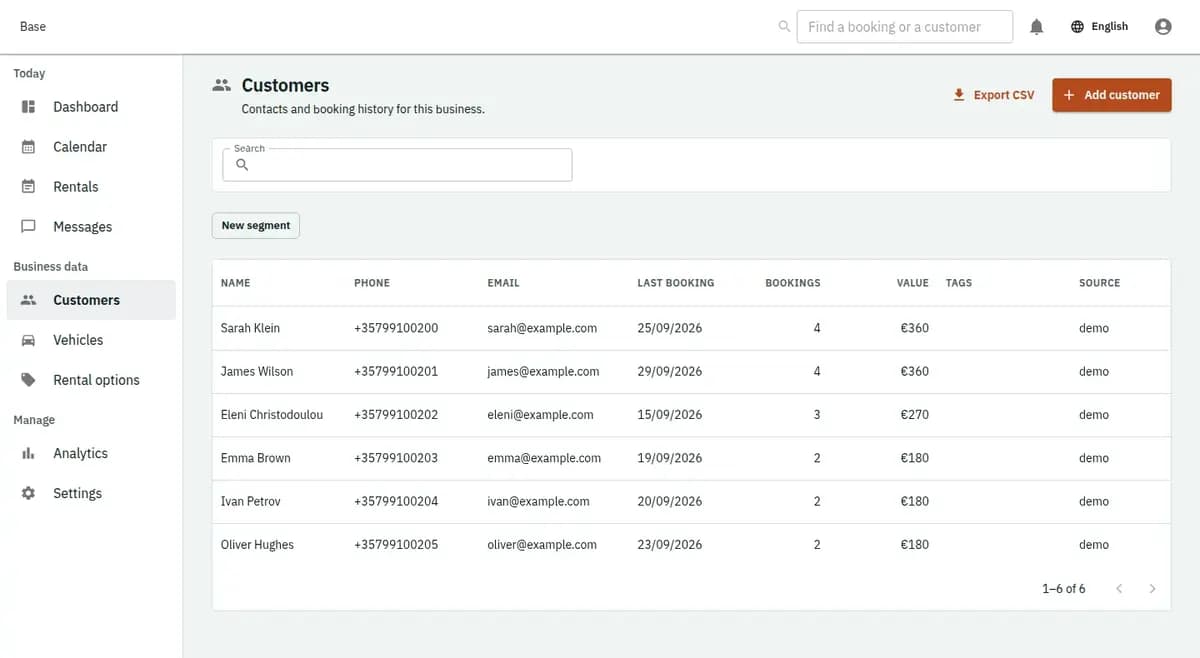
The booking console, with invented records — Customer management
A real console. The records in it are invented.

The same person books four times and is typed in four times, each time slightly differently, and by the fourth nobody can tell whether they owe money.

What is included

  • One record per person, with the history attached
  • Duplicate warning while typing, not after saving
  • Tags and your own fields, for what only you ask
  • Contacts encrypted with a key held per business
  • Export or erase on request, with the history kept
  • Less repeated data entry
  • Consistent service history
  • Portable customer records

A CRM for small business with returning customers

It is for the businesses where the same people come back: a salon with regulars, a garage that has serviced the same car for years, a clinic with returning clients, a rental yard with the family who takes the same boat every August. It holds the contact, the history and the handful of things that change how the work is done — and where a household brings several animals, children or vehicles, it keeps them together instead of scattered across identical names.

What it is not

It is not a sales CRM: there are no pipelines, no deals, no lead scoring and no campaigns. It is not a marketing list and does not send promotions. It is not a clinical, legal or financial file, and it should not become one because a text field was available.

What goes wrong without one record

Three ordinary failures that customers notice and businesses rarely count.

The same person exists three times

A phone booking, an online request and a walk-in produce three entries with the same name and no history between them. Nobody can see that this is the fourth visit, and the customer explains themselves again to somebody who ought to know.

What matters is in somebody’s head

The regular who always needs the ground-floor room, the client who cannot be scheduled after five, the customer who once had a bad experience. When that person is off, the knowledge is off with them, and the mistake it prevented happens again.

The history is spread across three places

Old bookings in one system, notes in a notebook, messages in a phone. Answering “when was he last in?” takes five minutes and often ends in a guess, which is precisely how a business ends up arguing with a customer about a fact.

Building the record from real bookings

Four habits, and none of them require anybody to do extra data entry.

1. The record grows from real bookings

A customer is created by their first booking, whether it came from the page, the phone or the counter, and everything after it attaches to the same person rather than starting a new one.

2. Keep households and their things together

Where the work is about something belonging to the customer — an animal, a vehicle, a property, a child in a class — it sits under the customer, so a family with three pets is one household with three different visit lengths.

3. Write the note that changes the work

Short, operational and useful to the next person: prefers Elena, allow an extra hour, gate code is with the neighbour, do not schedule after five. A note that would embarrass you if the customer read it does not belong in a booking system.

4. Read it before the conversation, not after

The record opens with the history: what was booked, when, how it ended, what was noted. That is what makes the phone call short and the customer feel recognised rather than processed.

Client management software with one history per person

Three things, all of them ordinary, all of them missing from a notebook.

One person, one history

Bookings from every channel land on the same customer, so the count of visits, the no-shows and the last conversation are all in one place rather than reconstructed from memory.

Context where the work happens

The note that matters travels with the booking to whoever is doing the job, which is the difference between knowing about the nervous dog and finding out about it.

The record leaves with you

Customers and history can be exported. What you have built stays yours, and a decision to stop using a product should never be a decision to lose your own contacts.

A returning customer and a family with three bookings

A returning customer, and a family with three bookings.

“It’s me again, from last month”

The record shows the last visit, who did the work and the note that was left. The customer is asked how the thing they mentioned last time went, rather than being asked for their surname twice.

One family, three bookings

Two children in different classes and a parent in another. They are one household, so a change of phone number is made once, and the three bookings are visible together instead of appearing as three unrelated names.

How much to keep about a person

A customer record is personal data belonging to somebody who trusted you with it, and restraint is a feature.

Only what the work needs

Contact details, the history of bookings and short operational notes. Health details, documents, identity numbers and anything a regulator governs belong in the system your profession uses for them — not accumulated here because there is space.

The business decides who sees and how long it stays

What each role can see is set when the team is set up, and the record can be exported or removed when a customer asks. Base does not sell, share or mine what you keep, and does not use it for anything other than running your bookings.

Preparing a customer database for bookings

Decide what you genuinely need on a customer beyond a name and a way to reach them — the list is shorter than it feels. Agree how notes are written, because a shared record is only useful if everybody writes the same kind of thing in it; “prefers Elena, allow extra time” is useful, an opinion about the customer is not. Decide who on the team can see contact details and who can only see their own day. Bring in the regulars you already have, with the two or three facts about each that keep going wrong. Then use the record for a month and delete the fields nobody filled.

Not a sales CRM or a marketing list

It remembers customers so the work goes well; it does not sell to them.
Not a sales CRM

No pipelines, deals, forecasts or lead scoring. The record exists to make the next booking better, not to manage a funnel.

Not marketing

Base does not send campaigns and does not build audiences. Operational messages about a booking are notifications; anything you want to promote belongs in a tool you chose for that, with the consent that requires.

Not a professional file

Medical, legal and financial records have their own rules and their own systems. A booking note is not a case note, and treating it as one creates a second version of a record that must never disagree.

CRM questions

Who on my team can see a customer’s details and notes?

That is set by role when the team is set up. The client management software keeps contact details, booking history and short operational notes on one record, and each role sees what its work needs. Because it is a customer database for bookings rather than a marketing list, notes stay practical, and a record can be exported or removed when the customer asks.

Do phone and online bookings land on the same customer?

Yes, when it is the same person. The record is one place, so history from every channel is visible together rather than split into duplicates.

Can several animals, vehicles or children sit under one customer?

Yes. The household holds the contact and the things belonging to it, so a family is one record with several very different bookings.

Can I export my customers?

Yes. The list and the history can be exported, because your customer relationships should not be held hostage by a product decision.

Does Base send marketing to my customers?

No. There are no campaigns and no audiences. Messages are operational: confirmations, changes and reminders about a booking.

Should health or legal details go in the notes?

No. Keep those in the system your profession uses. Booking notes are short, operational and readable by whoever is doing the work.

Next step

Open a workspace and set up one booking flow

Registration takes an email address. The operating model, services and resources are configured afterwards, in the console.
