Booking models

Room booking system for courts, rooms and shared equipment

The resource model is for the things a business rents out by the hour or the day without sending anybody with them: a padel court, a meeting room, a music studio, a hall, a desk, a machine in a workshop. The unit is one named thing, because the person booking wants court two with the floodlights, not any court, and because the hour after them still needs the twenty minutes it takes to reset the place.

  1. Create bookable resources

  2. Set hours and booking rules

  3. Reserve a duration

  4. Review utilisation and conflicts

Resource booking platform for courts, rooms, desks, parking and shared equipment.

What it solves

  • Rooms and facilities
  • Courts and desks
  • Shared business equipment
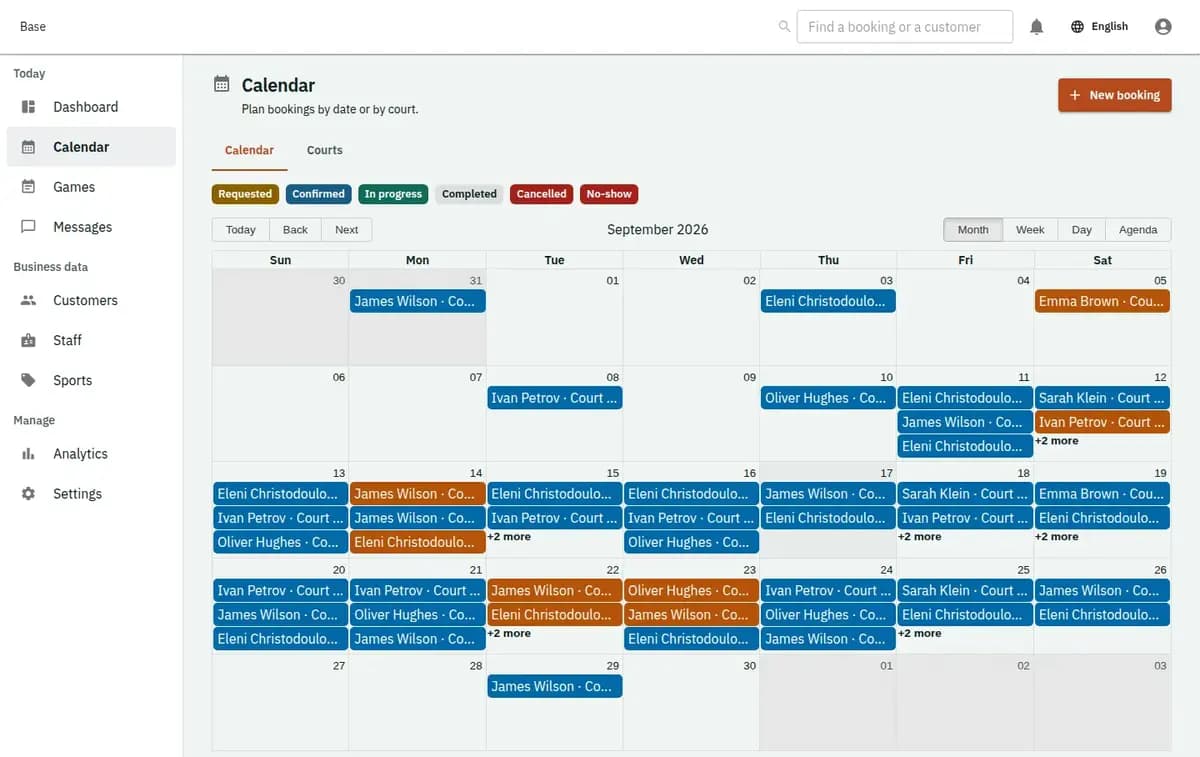
The booking console, with invented records — Resource booking
A real console. The records in it are invented.

When a resource booking system is the right fit

Use it for sports courts and pitches, meeting and conference rooms, studios, rehearsal and treatment rooms, halls, coworking desks, workshop bays and shared machines. It suits a club with four courts, a building with six rooms and a workshop with one lift, and it works whether bookings come from the public, from members, or only from your own staff.

When another model fits better

If a person has to be there to deliver the service, that is an appointment or a class. If the thing leaves your premises and comes back, that is rental, with its handover, condition and deposit. Nights in a property are accommodation. The test is simple: nothing is handed over, nobody is assigned, the customer uses the thing where it stands.

Why a shared court needs more than a grid

Four failures, all of them familiar to anybody who has run a diary on paper.

Resources that look alike are not interchangeable

Court two has floodlights, room A seats twelve and the small studio has the piano. Booking “a court” produces the conversation where somebody arrives at seven in the dark. Each resource is its own thing with its own name and its own calendar, and what a customer books is the one they will actually use.

The gap between two bookings is part of the booking

A room needs the chairs put back, a court needs sweeping, a machine needs cleaning down. Booked back to back with no gap, the second customer arrives while the first is still leaving. Turnaround is configured per resource and subtracted from availability, so the calendar stops selling the minutes you always spend.

Opening hours belong to the resource, not the business

The outdoor court is unusable at midday in August and unlit after eight in winter. The hall belongs to a club on Mondays. The workshop bay is free only when the mechanic is not in it. Hours, seasons and standing commitments live on the resource, which is what stops the site offering an hour that never existed.

Maintenance has to remove exactly the right hours

Resurfacing a court, servicing a machine, repainting a room: the resource goes out of use for a period, and only its own bookings are affected. A calendar that cannot block one thing forces you to close the whole day or to remember the exception yourself.

Publishing a set of rooms, courts and desks

Four steps, and most of the work is in the first two.

1. Enter every resource as itself

Name it the way your customers say it: court two, room A, studio one, bay three. Add what makes it different — capacity, equipment, indoor or outdoor — because that is what somebody is choosing between.

2. Give each one its hours, its rules and its turnaround

Opening hours by day and season, the minimum and maximum a booking may last, how far ahead people may book, and the reset time between bookings. Two courts side by side can carry different rules, and usually do.

3. Decide who books and how

Public booking from the website, members only, staff at the counter, or some combination. What matters is that every route lands in the same calendar, so a phone booking cannot collide with an online one.

4. Block, move and record what happened

Maintenance and standing commitments are entered as blocks that remove exactly their own hours. Bookings end as used, cancelled or a no-show, which over a season tells you which resource is worth another one and which is empty every Tuesday.

Three checks a court booking system runs before confirming

Three checks, and each of them exists because of an hour somebody lost.

One resource, one booking, plus its turnaround

A confirmed booking holds that resource for its whole period and the reset time after it. The next hour is offered only when it is genuinely available, so two customers are never in the same room at the same minute.

Rules belong to the thing they describe

Minimum duration, maximum duration, notice period and opening hours are per resource. The court that only takes full hours and the room that takes fifteen minutes can live in the same calendar without either rule leaking into the other.

A block removes only its own hours

Maintenance on court two takes court two out of service and leaves the other three bookable. Nothing has to be closed wholesale, and nobody has to remember which exception applies where.

A resurfaced court and a room two teams wanted

A resurfaced court and a room that two departments wanted.

Court two is resurfaced

The court is blocked for four days. Bookings already on it appear as the ones to move, the other courts keep taking bookings, and the site stops offering the hours that no longer exist. Nobody arrives to find a machine on the surface.

One room, two requests at ten

The first booking takes room A from ten to eleven, with fifteen minutes of turnaround after it. The second request for quarter past eleven fits; the one for eleven does not and is refused with the reason named. The second group is offered the time the room is genuinely free rather than the time the grid looked empty.

What a desk booking system keeps on each booking

A resource booking is a short, practical record — and it should stay that way.

Who has it, when, and what they were told

The booking keeps the customer or member, the resource, the period, the price if you set one, and the version of your rules that was accepted. That is enough to run the door and to settle a disagreement about what was booked.

Not access control and not surveillance

Base does not open doors, does not issue codes, does not track whether somebody actually used the room and does not connect to a lock or a camera. It says the room was booked and by whom; what happens physically stays with your building.

Preparing a meeting room booking system before you publish

List every resource under the name your customers use, and note what makes each different. Set real opening hours per resource, including the seasons when an outdoor one is unusable. Set turnaround honestly — the fifteen minutes you always need is the difference between a schedule that works and one that runs late all evening. Decide minimum and maximum booking lengths and how far ahead people may book. Enter the standing commitments that already exist, such as a club night or a regular internal meeting, before anybody can book over them. Then open one resource to the public before all of them.

Where a room booking system stops

The resource stays where it is and nobody goes with it. Both of those are what separate this from the other models.

Not appointments, classes or rental

If a person delivers something, use appointments or classes. If the thing leaves with the customer, use rental, which brings handover, condition and return. Using resources for those loses the person or the return.

No money in the calendar

A price can sit on a booking, but payment, deposits and refunds happen the way your business already handles them. Base records what was booked and what was agreed, not what was charged.

A refusal is a valid result

A resource already booked, a period that crosses maintenance, a duration outside your limits or a request inside your notice period stops the booking. The previous state stands, the reason is named, and a time that exists is offered instead.

Resource booking questions

Can I limit bookings to members or to my own staff?

Yes. As a resource booking system, Base can take public bookings from the website, bookings from members only, bookings made by staff at the counter, or a mix of these. Whichever routes you allow, they all land in one calendar, so whether you use it as a court booking system or a meeting room booking system, a phone booking cannot collide with an online one for the same court or room.

Can each resource have its own opening hours?

Yes, by day and by season, along with its own minimum and maximum booking length and its own notice period. Two courts side by side can behave differently.

Is turnaround time between bookings supported?

Yes, per resource. It is subtracted from availability, so back-to-back bookings leave the minutes you actually need to reset the space.

How is maintenance handled?

As a block on that resource for that period. Only its own bookings are affected and everything else stays open.

Can staff book on behalf of a customer?

Yes, into the same calendar as public bookings, which is what prevents a phone booking colliding with an online one.

Does Base control access to the room?

No. It records the booking; door codes, keys and locks stay with your building. Nothing physical is opened or monitored by the calendar.

Next step

Open a workspace and set up one booking flow

Registration takes an email address. The operating model, services and resources are configured afterwards, in the console.
