A booking calendar built to be answered from

Every business already has a calendar. What it usually cannot do is answer the only question that matters at the counter: can we say yes to this? That answer depends on more than an empty square — the right person, the room, the vehicle, the gap either side, the block somebody added this morning. A calendar earns its place when the answer it gives is the same answer the day will give.

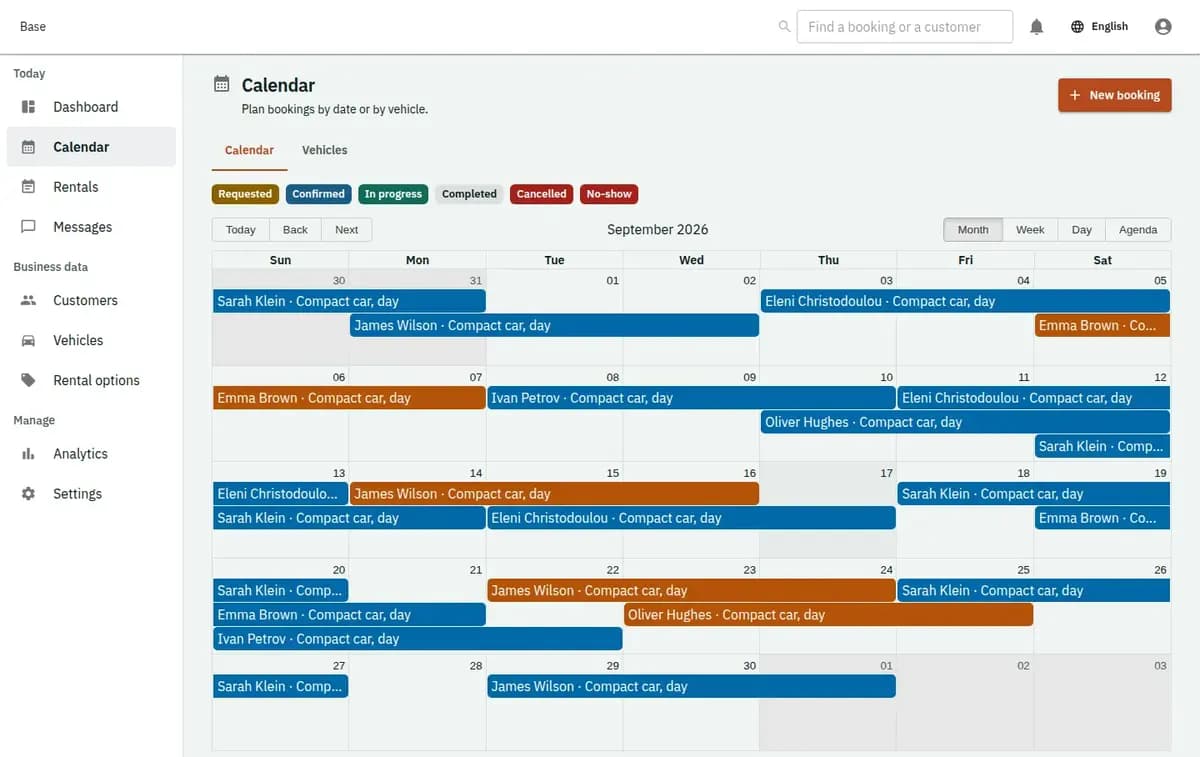
The booking console, with invented records — Availability calendar
A real console. The records in it are invented.

The promise is made before the calendar is checked, and the double booking is found by the customer standing at the counter. One view of what is free removes the guess.

What is included

  • Staff, rooms, vehicles and equipment on one timeline
  • Hours a day and periods of days in the same view
  • Opening hours, days off and one-off closures
  • Blocked time for maintenance, sick days and anything else
  • Drag a booking to move it; the resource follows
  • Fewer schedule conflicts
  • Clear resource ownership
  • Faster answers to customer requests

An availability calendar for the whole team

It is the screen the team keeps open: the day across everybody who works and everything that can be booked, the week when planning, and the specific person or item when somebody asks about them. It suits any of the booking models — appointments, sessions, resources, rentals, stays and field work — because in all of them the question is the same and only the ingredients differ.

What it is not

It is not a personal diary and does not replace the calendar on somebody’s phone. It is not a project plan, a shift-planning tool or a payroll timesheet. It shows what is booked, what is blocked and what is therefore possible.

Why looking at a calendar is not enough

Three reasons a calendar with everything on it still produces the wrong answer.

What is free depends on several things at once

The hour needs the person who does that work, the room it happens in, the vehicle that gets there and sometimes an item that has not come back yet. A view that shows only one of those makes somebody hold the rest in their head, and that is where the mistakes live.

Half the day is not bookings

Maintenance, a delivery, an inspection, a training morning, a wedding somebody is going to. These are not customer bookings, but they consume the same day, and a calendar that cannot hold them makes people keep a second one.

The answer has to be the same everywhere

The person on the phone, the person at the counter and the customer on the booking page must be told the same thing. When availability lives in two places, the difference between them is discovered by the customer.

Reading the day in four moves

Four things the view is built to do, in the order a working day needs them.

1. See the whole day in one place

Everyone working and everything bookable side by side, with what is committed, what is blocked and what remains. The point is not decoration; it is that nobody has to open two screens to answer a question.

2. Ask about one person or one item

When a customer asks for Maria, or for the van, the view narrows to exactly that and shows their real hours, days off and existing commitments — including the ones that are not bookings.

3. Block what is not a booking

A morning of maintenance, a closed afternoon, a piece of equipment in for repair, a holiday. Blocks remove exactly their own hours and are visible to everybody rather than living in a message.

4. Move something and see what it touches

When a booking moves, the calendar checks the same rules it would for a new one and shows what no longer fits. A change is a decision made with the consequences visible, not a drag that quietly overbooks a Tuesday.

One online booking calendar for every channel

Three things behind the view that decide whether the answer is real.

Everything the job needs is checked together

Staff, rooms, vehicles, equipment and countable extras are verified as one, so a booking is never confirmed with three of the four things it needs.

Buffers and turnaround are part of the picture

The gap for cleaning, preparation or travel is subtracted from what is offered. The calendar stops selling the minutes that were always going to be spent.

One source for every channel

The counter, the phone and the booking page read the same availability, which is what makes the same question get the same answer three different ways.

Thursday at four, and a van in for repair

The hour that looked free, and the morning that had to disappear.

“Can you do Thursday at four?”

The square is empty, but the treatment room is taken and the buffer after the previous job has not finished. The calendar says no and offers half past four, which is the answer the day would have given anyway — just three hours earlier and without an apology.

A van goes in for repair

The vehicle is blocked for two days. Only the jobs that needed that van appear as the ones to move, everything else is untouched, and the booking page stops offering what the yard cannot do.

Who sees what on the shared calendar

A shared calendar is a shared window into people’s working lives, so what it exposes is worth deciding deliberately.

Working hours, not personal lives

A day off is a day off; the calendar does not need to say why. Blocks can carry a short operational note where the team needs one, and nothing more should be typed in because a field is available.

Roles decide what is visible

Not everybody needs to see every customer detail on every booking. What each role can see and change is a decision the business makes when setting up, not an accident of who opened which screen.

Preparing hours, rooms and vehicles

Enter working hours as they really are, including the afternoon somebody never works and the season when the hours change. Enter the rooms, vehicles and equipment that genuinely constrain you and leave out the ones that do not — a calendar with twenty resources nobody checks is harder to read than one with three that matter. Set buffers to the time you actually take. Put the standing commitments in before you publish anything: the club night, the weekly delivery, the training morning. Then use the view for a week alongside whatever you use now, and correct the places where the two disagree.

What the booking calendar leaves to people

It answers what is possible. Deciding what should happen is still work for people.
Not shift planning or payroll

Rotas, overtime, holiday entitlement and hours worked belong in the tools you already use for employment. The calendar knows when somebody is available, not what they are owed.

Not automatic optimisation

Nothing rearranges your day to fit more in. Base shows what fits and refuses what does not; which of the possible arrangements is best is a judgement your team makes.

It cannot know what you did not enter

A constraint kept in somebody’s head is a constraint the calendar cannot check. The value of the answer depends on the resources and rules actually being in there.

Booking calendar questions

Does it sync with Google or Microsoft calendars?

Yes, both ways. The availability calendar syncs with Google and Microsoft calendars, so your team can keep using the calendar they already check. What customers see in the online booking calendar is calculated from the same staff, rooms, buffers and blocks as the counter view, so the website and the desk give the same answer about whether an hour can be booked.

Does it show people and resources together?

Yes. Staff, rooms, vehicles, equipment and countable extras appear in one view and are checked together when something is confirmed.

Can non-booking time be blocked?

Yes. Maintenance, closures, deliveries, training and holidays are blocks that remove exactly their own hours and are visible to the whole team.

Do buffers affect what is offered?

Yes. Preparation, cleaning and travel time are subtracted from availability, so back-to-back bookings leave the minutes the work actually takes.

Is the online availability the same as the counter’s?

Yes, it is calculated once and read by every channel, which is what stops the phone and the website disagreeing.

Does it rearrange bookings automatically?

No. It shows what fits and refuses what does not. Deciding which arrangement is best stays with your team.

Next step

Open a workspace and set up one booking flow

Registration takes an email address. The operating model, services and resources are configured afterwards, in the console.
