Booking reports and exports that keep the data yours

Most dashboards are decoration: large numbers that go up, charts nobody acts on, and a monthly total that hides the fact that Tuesdays are empty. The useful questions in a booking business are smaller and more awkward. Was last month actually busier than the one before? Which hours never sell? How many people did not turn up, and is it always the same day? And underneath all of them: can I get my own data out?

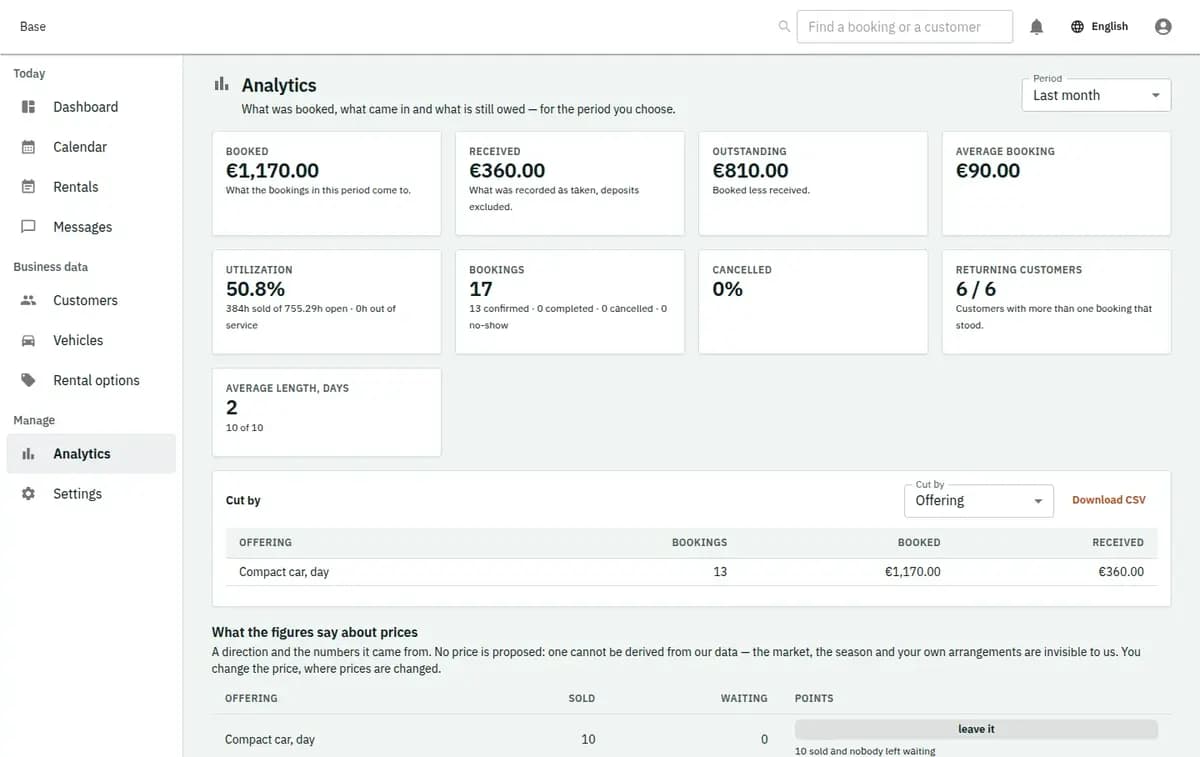
The booking console, with invented records — Analytics and exports
A real console. The records in it are invented.

«Was last month better?» is answered from memory, and memory is generous.

What is included

  • Booked value and money received, never merged
  • The same numbers by day, and against the period before
  • Utilisation: how much of the bookable time was sold
  • One number that this trade asks for and others do not
  • CSV of everything, and a full export when you leave
  • Workload visibility
  • Reusable exports
  • No invented vanity metrics

Operational questions booking reports answer

The operational questions you would otherwise answer by feeling: how busy each day and each hour really is, which staff member or resource is fully committed while another is idle, how many bookings ended as no-shows or late cancellations, and how this month compares with the last one. It suits a business small enough that a wrong impression can survive for a year, which is most of them.

What it is not

It is not a business-intelligence platform, a marketing analytics product or an accounting report. It does not attribute bookings to advertising, does not forecast demand, does not price anything and does not track individual people across the internet. It counts what happened in your own bookings.

Why the numbers usually mislead

Three ways a business ends up believing something that is not true.

A monthly total hides the shape of the month

Two hundred bookings can be a full week and three empty ones. The total looks healthy while a third of your capacity is never sold, and the decision that follows — hire somebody, buy another van — is made on the wrong picture.

Nobody counts the no-shows

They are remembered as “a few” and are usually more, and they cluster: one day, one time, sometimes one type of booking. Counted, they turn into a rule worth writing. Uncounted, they are a mood.

The data is stuck in the product

A report you cannot export is a report you cannot check, share with an accountant or take with you. Anything that holds your operating history hostage will eventually cost you more than it saves.

Using booking analytics without fooling yourself

Four habits, and the last one is the one that keeps the numbers honest.

1. Start from a question, not a dashboard

“Should I open on Sunday?” and “is Maria over-booked?” are answerable. “How are we doing?” is not, and a screen that pretends otherwise will be looked at once a quarter and believed anyway.

2. Look at shape before totals

Which days, which hours, which resources. The distribution is where decisions live; the total is where comfort lives.

3. Count the outcomes, not just the bookings

Attended, cancelled in time, cancelled late, no-show. This is only possible if the team closes bookings honestly, which makes recording outcomes the cheapest analytics investment you can make.

4. Export when the question is bigger

Anything you want to compare with money, staff cost or a season two years ago belongs in a spreadsheet or your accountant’s tools. Export the rows and do the thinking where the other numbers already live.

Workload, outcomes and how to export bookings to Excel

Three practical outputs, and no invented metrics.

Workload by day, hour and resource

Where the demand actually falls, so opening hours, staffing and the decision to buy another item are made against the shape of the week rather than a feeling about it.

Outcomes you can act on

Attendance, cancellations by notice, and no-shows, counted per period. That is the basis for a deposit rule or a notice period that you can defend when a customer argues about it.

Exports that are genuinely yours

Bookings and customers can be exported for accounting, analysis or a move to something else. Portability is not a feature to be bargained over; it is what makes the rest trustworthy.

A Sunday not worth opening and Monday no-shows

A Sunday that was never worth opening, and a no-show pattern.

Should we open on Sunday?

The impression is that Sundays would be busy. The distribution shows Saturday afternoons already unsold and Friday evenings full. The business extends Friday instead — a decision that cost nothing to make and would have cost a season to unmake.

The no-shows on Monday mornings

Counted, they cluster in the first hour of the week and mostly on one type of booking. The rule that follows — a reminder the evening before, or a deposit for that slot — is specific rather than a blanket policy that annoys everybody else.

What the numbers are made of

A report is only as honest as the records under it and the questions asked of it.

It counts your bookings, not people’s behaviour

There is no tracking across sites, no profiling and no advertising data. The reports are built from what your business recorded about its own work.

Small numbers deserve small conclusions

Forty bookings a month will not support a confident percentage. Base shows counts and distributions rather than dressing a handful of events as a trend, because the most expensive mistakes come from believing a statistic that never had enough behind it.

Picking the questions worth asking

Decide the two or three questions you would actually change something about, and ignore the rest until they matter. Make closing a booking with its real outcome part of the routine, because every useful number here depends on that one habit. Agree who looks at the reports and when — a monthly ten minutes beats a dashboard nobody opens. Export a month early on and check that the rows say what you think they say. Then leave the numbers alone long enough to mean something; a week is noise.

No forecasting, accounting or ad attribution

It reports what happened. Everything predictive or financial belongs elsewhere.
No forecasting or optimisation

Nothing predicts next season, recommends a price or rearranges your week. Those are decisions with consequences a calendar has no business making on your behalf.

Not accounting

Revenue, tax, payroll and reconciliation live in your accounting tools. Exported bookings are an input to that work; the report is not a financial statement.

No marketing attribution

Base does not know which advert somebody saw and will not pretend to. It knows what was booked, by whom, when and how it ended.

Reports questions

Can I give my bookings to my accountant as a spreadsheet?

Yes. Bookings and customers can be exported to Excel or CSV, so you can export bookings to Excel for your accountant, compare them with staff costs or keep your own archive. The booking analytics inside Base cover workload by day, hour and resource, utilisation and outcomes such as no-shows; anything that needs money or older seasons alongside belongs in the spreadsheet.

What can I actually see?

Workload by day, hour and resource, utilisation across staff and items, and outcomes such as attendance, cancellations and no-shows for a chosen period.

Can I export my data?

Yes. Bookings and customers can be exported for accounting, deeper analysis or a move elsewhere. Your operating history is yours.

Does it forecast demand?

No. It reports what happened. Predicting next season, setting prices and deciding on staffing stay with you.

Does it track my customers online?

No. There is no cross-site tracking, no profiling and no advertising data. The numbers come from your own bookings.

Why so few percentages?

Because a small business month rarely has enough events to support one. Counts and distributions tell the truth; a confident-looking percentage over forty bookings usually does not.

Next step

Open a workspace and set up one booking flow

Registration takes an email address. The operating model, services and resources are configured afterwards, in the console.
