Class booking

Gym management software for classes, passes and trainers

  • Gym scheduling software for instructors and rooms
  • Places are counted per session
  • Instructors and rooms are checked together

No card asked for · nothing taken from a booking · your data exports

Operating model
Class booking
What is booked
Class → Capacity → Schedule
Getting started
Classes, instructors and passes to set first

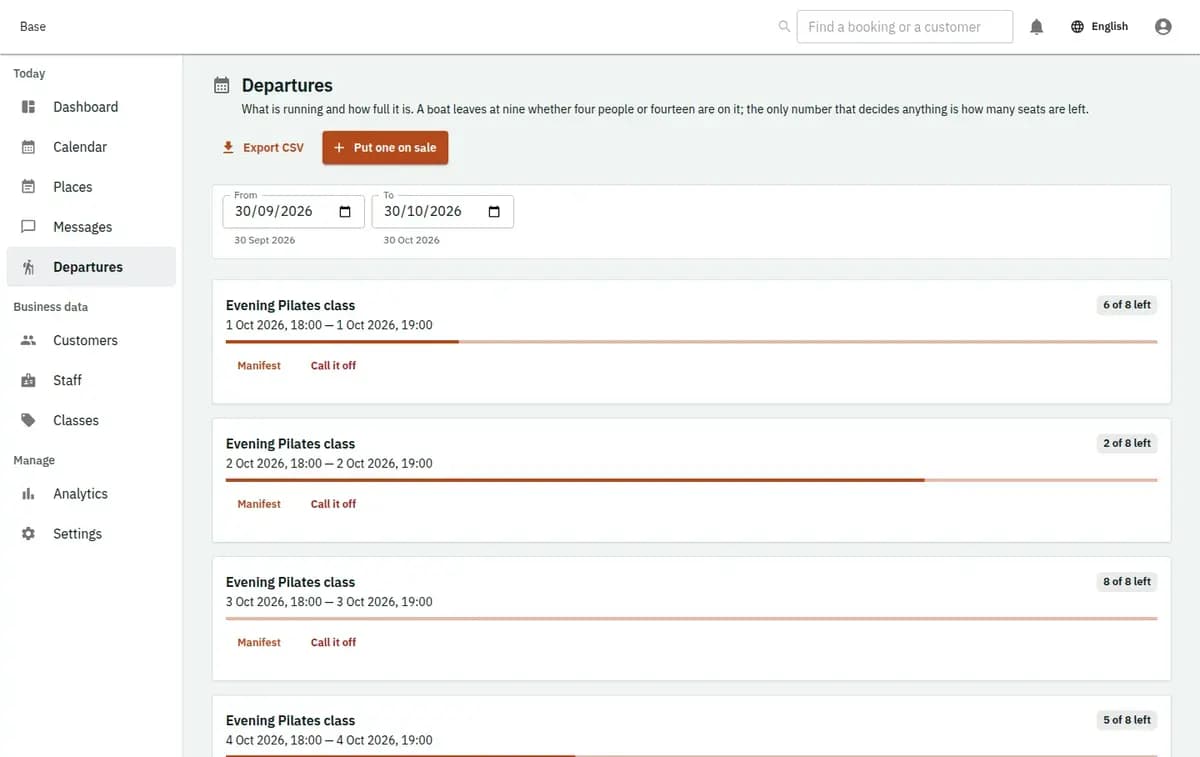
Base gives a small Cyprus gym one place for the class timetable, the personal training diary and the class passes people buy at the desk. Members book a spin class or a session with a trainer from your booking page, in English, Greek or Russian, and each class keeps its own places, instructor, room and register. A pass counts down as visits are used, a full class can take a waiting list, and reception sees the same day the trainers see on their phones.

Base gym timetable with classes, remaining places, trainers, rooms and class pass balances
A real console. The records in it are invented.

Who this gym management software fits

It fits an independent gym with one to a few rooms that runs a weekly class timetable alongside personal training: strength circuits, spin, boxing fitness, mobility, small-group sessions and one-to-one hours with a trainer. It suits owners who sell packs of visits, keep a handful of instructors on the rota and want gym scheduling software that lets customers book and cancel themselves, instead of messaging the front desk at eleven at night.

Gym booking system for classes and sessions

The same steps cover a group class and a personal training hour; only the limit changes — places in a class, the trainer’s time in a session.

  1. 1. Describe classes, trainers and rooms

    Add each class with its length and level, the instructors who teach it and the room or studio it uses. Add personal training as services with a duration, a short buffer for wiping down equipment and the trainers who offer them. Rooms carry their own capacity.

  2. 2. Publish the week

    Build the timetable as a series of real sessions with dates, places, instructor and room. A public holiday or a trainer’s week off is changed on the affected sessions, so one cancelled Thursday does not rewrite the rest of the month.

  3. 3. Let members book

    Customers book from your public page or the booking widget on your own site, choose a class or a trainer and get a confirmation by email or Telegram. They manage their bookings in the customer portal without creating an account.

  4. 4. Use passes and check people in

    At the door, reception or the instructor marks arrivals on the class register. A visit is taken from the customer’s class pass, no-shows are recorded and late cancellations follow the rule you set for the gym.

  5. 5. Review attendance

    Attendance per class, per instructor and per time slot shows which sessions earn their room and which need a new time. Export to spreadsheets when your accountant or a business partner wants the figures in their own format.

Where a small gym loses track

Most small gyms run on a group chat, a paper sign-up sheet and a drawer of punch cards. Each works until two of them disagree.

The early class is full in the chat, not on the sheet

People reply to the group message, someone signs up at the desk and the instructor counts heads at the door. When places are taken in one gym booking system rather than three channels, the limit is the room’s real limit and the twelfth bike is not promised to a thirteenth rider.

Paper class cards go missing

A ten-visit card lives in a wallet, gets left at home or runs out without anyone noticing. Staff stamp it when they remember. Arguments about whether a visit was used start at the desk, with a queue forming behind.

Trainers keep their own diaries

Personal training is arranged by text straight with the trainer, so reception cannot see that the trainer is already taken at six. The owner hears about a double booking from the customer who turned up for it.

Cancellations arrive too late to matter

A place freed an hour before class stays empty because nobody knows who wanted it. Without a waiting list the session runs half full while two people who asked last week trained somewhere else.

Gym scheduling software for instructors and rooms

A gym timetable has to respect three limits at once: the places in the room, the instructor teaching and the room itself.

Places are counted per session

Saturday boxing in the main hall can take twenty, Tuesday mobility in the small studio eight. When the last place goes, the session closes on the booking page and new requests can join the waiting list instead.

Instructors and rooms are checked together

A class needs its named instructor and its room free at that hour. If the trainer is already booked for a private session or the studio is blocked for repairs, the conflict is shown before the class goes live.

Class passes instead of paper cards

Sell a pack of visits, record the payment taken at the desk or by bank transfer, and let each booking use one visit. Customers see how many remain in their portal, and staff stop counting stamps. Base records the payment; it never handles the card.

Waiting lists that refill the room

When someone cancels, the next person on the waiting list can be offered the place, so a late cancellation becomes a full class rather than an empty bike.

Personal training inside the same calendar

One-to-one and small-group sessions sit on the same calendar as the classes. A trainer who teaches the evening circuit cannot be booked for a private hour at the same time, and two-way sync with Google or Microsoft calendars puts both on the trainer’s own phone.

Ordinary days in a small gym, in one place

Ordinary days, each handled in one place rather than across a chat and a notebook.

Monday spin is full by Sunday

Fourteen bikes, fifteen requests. The fifteenth person joins the waiting list. On Monday afternoon someone cancels from the portal, the place is offered to the first person waiting, and the instructor’s register shows the change before the class starts.

A trainer away for a week

Four classes need cover. Reception names the substitute on each session, and the people booked are told by email or Telegram before they arrive. Private sessions for that week are moved with the customers instead of being discovered at the door.

A ten-visit pass runs out

A regular books her tenth class. Her portal shows the pass is used up, and at the desk staff sell her a new pack and record the cash payment. Her next booking takes its first visit from the new pass.

A newcomer books a trial session

Someone who has just moved to Limassol books an introductory session with a trainer on the gym’s booking page in Russian. The trainer sees it in their Google calendar, and after the session reception suggests a class pass that matches how often they plan to come.

What the gym keeps about members

A booking record is about a time slot and a visit, not about the person’s body.

Attendance, not health records

The register shows who booked, who came and who did not. Injuries, medical notes and training progress stay with the trainer under your own rules, not on a booking just because the session is physical.

Every change has a name on it

Who moved a class, cancelled a session, adjusted a pass or marked a no-show stays visible, so a dispute at the desk is settled from the record rather than from memory.

Customers manage their own bookings

The customer portal opens from a link, without an account or password, so members can cancel or rebook within your rules and see what is left on their pass.

Your figures stay yours

Bookings, attendance and pass balances can be exported to spreadsheets at any time. There is no commission on bookings, so the price of a class is simply what the gym charges.

Classes, instructors and passes to set first

List classes with length, level and their usual room. Add instructors and trainers with working hours, and personal training services with durations and buffers. Decide the places per room, the cancellation window and how many visits each class pass holds. Publish a few weeks of timetable, add the booking widget to your site and send regulars the link to your booking page. A small gym can start on the Free plan at €0 with 2 staff accounts and move to Standard at €19 or Pro at €39 when the team grows.

What a gym still needs elsewhere

Base runs the timetable, the bookings and the passes. Several things gyms usually rely on are not part of Base.

Where a gym needs a different system

Base is not door or turnstile access control, so it cannot open a gate when a member taps a card. It does not bill memberships automatically each month, process cards, run payroll or track workouts and body measurements. A large club whose main question is who walked through the door at six in the morning, rather than who booked which class, needs an access and billing system first.

No door or turnstile access control

Base does not open doors, read key fobs or control turnstiles, and it does not know who entered the building outside a booked class. If members train in open hours with a card at the door, that stays with your access system.

No automatic membership billing

There are no recurring monthly charges, direct debits or automatic renewals. Base does not process cards: payments and deposits taken at the desk, by terminal or by bank transfer are recorded as facts, and class passes are sold as packs of visits.

No workout or body tracking

Training plans, lifting logs, wearables, body measurements and nutrition are not part of Base, and it holds no medical information about members.

No SMS, payroll or shop till

Notifications go by email and Telegram, not SMS. Trainer pay, payroll and selling drinks or supplements at a till are handled in other tools.

Full means full

A full class, an instructor already booked or a blocked room stops the booking rather than squeezing someone in. The refused request does not oversell the session; the customer is offered another time or the waiting list.

Gym management software questions

Who is this gym management software for?

Small and independent gyms in Cyprus that run classes, personal training and class passes. A large club that depends on door access, automatic monthly billing and a shop till will need other systems for those parts.

Can members book classes and personal training in one place?

Yes. Classes and one-to-one sessions share one booking page and one calendar, so a trainer cannot be booked twice, and members see both kinds of booking in their portal.

How do class passes work?

You create a pass with a number of visits, sell it at the desk and record how it was paid. Each booked class uses one visit, and the remaining balance is visible to staff and to the customer.

Does Base charge monthly memberships automatically?

No. There is no recurring billing, and Base takes no card payments. Payments you take by terminal, cash or transfer are recorded, which keeps pass balances and the booking history accurate.

Can Base control the gym door?

No. There is no door, key fob or turnstile control. Base knows who booked a class and who staff checked in, nothing more.

Will trainers see their sessions on their phones?

Yes. Two-way sync with Google and Microsoft calendars puts classes and private sessions in each trainer’s own calendar, alongside whatever else they have planned. Notifications go by email or Telegram.

What does it cost?

There is a Free plan at €0, Standard at €19 and Pro at €39, each per business. Base takes no commission on bookings.

Next step

Open a workspace and set up one booking flow

Registration takes an email address. The operating model, services and resources are configured afterwards, in the console.